All ProductsAdult educators • Adapt to your curriculum

Teacher Planner Excel | Lessons, Assessment & Follow-Up

Lesson objectives • Assessment evidence • Valid-score checks • Follow-up records • Weekly teaching review

Keep the purpose of the lesson close to the evidence you collect. Plan objectives, record assessed scores and organise a specific follow-up—with editable teaching records and reflection prompts you can adapt to your own curriculum.
Rs. 399.00 Regular price Rs. 999.00 60% OFF
  • Instant Digital Download
  • Secure Payment
  • Lifetime Access
  • Any Device / Easy Access

Secure Checkout

Razorpay Visa Mastercard RuPay UPI Google Pay PhonePe

Your payment information is protected and encrypted.

Teacher Planner Excel | Lessons, Assessment & Follow-Up

About This Guide

A Lesson Plan With a Useful Next Step

A good activity is easier to choose when the learning purpose is clear. This teacher planner gives you a practical place to connect the objective, teaching sequence, evidence and follow-up. Use it to make the reasoning behind the lesson visible, then revisit that reasoning after teaching. Start with your own curriculum and learners, and keep the plan focused on what you want to observe rather than filling a timetable with activity names.

Keep the Objective Beside the Evidence

The Lessons register places the learning objective, activity, evidence or exit ticket and follow-up on the same record. That connection helps you ask whether the activity is likely to show what you need to know. Use the date, class and lesson identifier to give the record context. When you return to it, the intended learning and the question left for the next lesson remain easy to find.

Give Missing Scores Their Correct Meaning

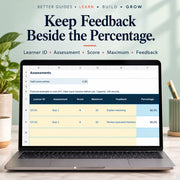
A missing assessment result should not quietly become an assessed zero. The Assessments sheet distinguishes incomplete or invalid score entries from genuine numeric results. Record the learner identifier, assessment, score, maximum and feedback together. A valid percentage retains its denominator, while the headline counts valid score entries. Use that record to inform your own review without treating a single percentage as a grade, diagnosis or complete account of learning.

Carry an Observation Into Follow-Up

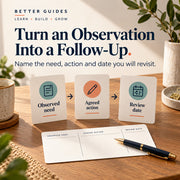
An observed need becomes more useful when you describe the action and decide when to revisit it. Follow Up provides space for the evidence date, need, agreed response, review date and status. Use clear, specific language so the record explains what you intend to try next. Dates and status remain under your control, making this a working record rather than an automatic recommendation or reminder system.

Make Reflection Part of Preparation

The fillable lesson worksheet prompts you to consider prior knowledge, materials, teaching sequence, accessibility adaptations, evidence and the next adjustment. The editable HTML companion adds a weekly teaching review for objectives, learning evidence, misconceptions, workload and communication notes. Together they support a deliberate pause between collecting information and choosing the next response. Adapt the prompts to your role, setting and school practice rather than copying a fictional example as a lesson.

Keep Your Teaching Records Under Your Control

Save a private working copy, replace the examples and use pseudonymous learner identifiers with any identification key kept separately. The guides explain the prepared ranges, input cells and formula columns. Choose the paper size that suits your worksheet and viewer. Bring the kit into your existing planning routine for a clearer connection between lesson intention, observed evidence and follow-up, while retaining your own judgement and institutional requirements.

What You Will Receive

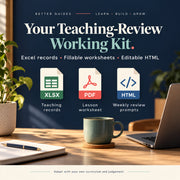
Your download includes an editable Excel workbook with Lessons, Assessments and Follow Up, A4 and US Letter guides and fillable lesson-planning worksheets, editable HTML planning and weekly teaching-review prompts and a customer start note. Paper-size versions repeat content. No native Google Sheet, AI pack, curriculum, school app or physical product is included.

  • Instant Digital Access

  • Easy-to-Follow Learning

  • Designed for Hands-On Learning

  • Builds Curiosity & Problem-Solving Skills

Why Choose This Teacher Classroom Planner?

  • Connect the lesson activity with a clear learning objective.
  • Keep feedback beside the score and its maximum.
  • Distinguish missing assessment information from a genuine zero.
  • Record an observed need and a specific response to revisit.
  • Bring weekly reflection back into your next teaching plan.
Fictional adult teachers discussing a lesson-planning adjustment without learner data.

What You Can Put Into Practice

  • Draft a lesson record with an objective and evidence question.
  • Record valid assessment percentages without assigning grades.
  • Describe follow-up with an action, review date and manual status.
  • Use weekly prompts to review misconceptions and materials.
  • Maintain a private working record with pseudonymous learner IDs.

What’s Inside

Lesson Records With a Clear Purpose

Use Lessons to record the identifier, date, class, learning objective, activity, evidence or exit ticket and follow-up. Start with the objective and decide what observation would be useful before choosing the activity. The record count reflects populated lesson IDs, not unique or completed lessons. Adapt the entries to your curriculum and reconcile duplicated identifiers or incomplete records yourself.

Assessment Evidence Without Silent Zeros

Assessments holds the learner identifier, assessment, score, maximum, feedback and calculated percentage. Populated rows need both labels, numeric marks from zero to the maximum and a positive maximum. Missing or invalid required entries show CHECK score and do not enter the valid-score count. Fractional marks are allowed. The headline counts entries, including repeat learners; it does not calculate overall attainment or assign grades.

Follow-Up With an Action and Review Date

Record the learner identifier, evidence date, observed need, agreed action, review date and status. Use the notes to explain what you plan to revisit, rather than inferring ability from one result. The table is a manual register and does not import assessment data, link IDs automatically or send reminders. Its count is populated learner IDs, not completed actions or unique learners.

Fillable Lesson Worksheets in Two Sizes

Choose A4 or US Letter for the same planning prompts: class/date, objective, prior knowledge/materials, sequence, accessibility adaptations, evidence/feedback and next adjustment. Fill text fields in a compatible viewer, save and reopen your copy to check it. The fields do not calculate. Use the worksheet to prepare a lesson or reflect on what you want to change after teaching.

Editable Planning and Weekly Review Prompts

The HTML companion repeats the planning worksheet questions and adds a weekly review. Consider objectives addressed, evidence of learning, misconceptions to revisit, workload and materials, plus follow-up communication notes. Edit placeholders in an HTML-capable editor. The prompts provide a structure for your own observations; the kit does not supply subject lesson content, differentiated activities, school policy or an accredited curriculum.

Guides, Prepared Ranges and Private Records

The guides explain fictional examples and the input/formula distinction. Each workbook table uses rows 8–107; extend ranges deliberately if needed. Preserve percentage formulas and use pseudonymous learner IDs under your institution’s privacy practices. The paper-size versions repeat content. No native Google Sheet, AI prompt pack, school-platform connection, automatic grading or diagnostic assessment is included; your professional judgement remains central to the record.

Actual fillable teacher planning worksheet with evidence and next-lesson prompts.
Actual Assessments spreadsheet with fictional sample marks and feedback.
Learning objective, evidence and follow-up concepts in the teacher planning routine.
Observed need, agreed action and review date as manual teaching follow-up concepts.

Who It’s For

  • Classroom Teachers Planning Their Own Lessons — You want objectives, activities and evidence to connect clearly. Use the lesson register and worksheet to explain the purpose of a session, then record a specific adjustment after seeing the response.
  • Early-Career and Trainee Teachers — You are building a planning routine and need useful prompts beyond an activity list. Work through prior knowledge, materials, accessibility adaptations and evidence, while following your mentor’s guidance and your setting’s curriculum requirements.
  • Private Tutors and Small Teaching Practices — You teach small groups and want clearer records of assessed work. Keep scores with their denominators and feedback, then describe the follow-up action without presenting a missing result as a zero.
  • Home Educators Organising Their Teaching — You plan learning within one household and want a consistent way to reflect. Adapt the objective and weekly-review prompts to your materials, keeping observations and the next lesson decision together in your own records.
  • Teaching Mentors and Learning-Support Practitioners — You discuss a purchaser’s completed plans and need specific questions about evidence and next steps. Use the records to support that discussion within the internal-use licence; the kit does not provide school-wide source-file redistribution or diagnostic assessment.

Seven fictional adult educator groups shown for the teacher planning toolkit.

A closer look

Learning objective, evidence and follow-up concepts in the teacher planning routine.

How It Works

  1. Purchase

    Complete your secure checkout.

  2. Download

    Access your digital files after purchase.

  3. Explore & Enjoy

    Put your new ideas into practice.

Frequently Asked Questions

What is included in the Teacher Classroom Planner?

An editable Excel workbook with Lessons, Assessments and Follow Up, A4 and US Letter guides and fillable planning worksheets, editable HTML planning/weekly-review prompts and a start note. The paper-size versions repeat the same content.

Does it supply lessons, a curriculum or assessment questions?

No. Add your own subject content, objectives, activities and assessments. The kit provides planning, evidence and reflection structures, not a question bank, accredited curriculum, differentiated activities or teaching qualification.

How are missing and zero scores handled?

A populated assessment row needs a learner ID, assessment label, numeric score and positive maximum. The score must be from zero to that maximum. Missing/invalid required values show CHECK score and are excluded from the valid-entry count. A genuine assessed zero is numeric and remains valid; fractional marks are allowed.

Does the workbook assign grades or calculate overall attainment?

No. It calculates individual score/maximum percentages and counts valid score entries across prepared rows. Repeat learners and assessments also count. It does not count unique learners, weight assessments, apply a grading policy, diagnose ability or automatically decide an intervention.

Will the tables link learner records or send review reminders?

No. Lessons and Follow Up are manual registers, and identifiers, dates and status need your review. They do not import assessment data, join records automatically or send notifications. Record counts indicate populated IDs, not complete lessons, unique learners or completed actions.

Are the worksheets editable, and is there a Google Sheet?

The PDF worksheets have fillable text fields; save and reopen your completed copy to check entries. Fields do not calculate. Edit the HTML in a compatible editor and use spreadsheet software for XLSX. No native Google Sheet, AI prompt pack, Word template or school-platform integration is supplied. Native compatibility and printing remain unverified.

How much data can I enter, and how should learner records be stored?

Each workbook table uses rows 8–107. Deliberately extend formulas and validation for more records. Use pseudonymous learner IDs, keep any identity key separately and follow your institution’s privacy practices. Preserve formula columns and replace the fictional examples before real use.

Can I share the planner with a whole school?

The licence permits internal use by one purchaser, household or business as appropriate. Your completed reports and documents may be shared; source templates may not be resold or redistributed. It does not grant school-wide redistribution of source files. Check your setting’s policies when using learner records.

Connect the Lesson With What Comes Next

Teacher Planner Excel | Lessons, Assessment & Follow-Up

Rs. 399.00 Regular price Rs. 999.00 60% OFF